

Desktop Extension ONLY no mobile WALLET SUPPORT!
What do you will need to do?
1. Find your wallet directory and files in chrome based browser or firefox
2. Remind everything you know about the password
3. Contact with us for the next steps
If you have lost access to your MetaMask wallet here are steps how to find necessary files. This may happen when, you have lost your Secret Recovery Phrase, you do not remember your password or for any other reason you are not able to unlock the wallet with your known password.
Where are wallet files? (chrome based browsers)
In Windows 10 or 11, you should be able to find the location of the wallet directory by going to this folder location (you need to be able to see the hidden files):
C:\Users\USER_NAME\AppData\Local\Google\Chrome\User Data\Default\Local Extension Settings\nkbihfbeogaeaoehlefnkodbefgpgknn
or if you have multiple profiles you can find it here:
C:\Users\<your-user-name-here>\AppData\Local\Google\Chrome\User Data
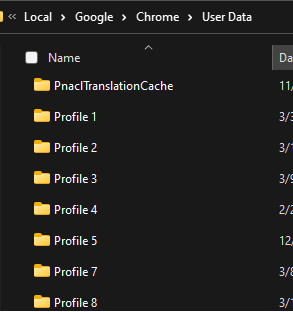
On a Mac, the location of the folder should be:
Library>Application Support>Google>Chrome>Default>Local Extension Settings>nkbihfbeogaeaoehlefnkodbefgpgknn
on Linux like ubuntu, the files you may find here:
/home/user/snap/brave/current/.config/BraveSoftware/Brave-Browser/Default/Local\ Extension\ Settings/nkbihfbeogaeaoehlefnkodbefgpgknn/
- If you’re having trouble finding this location, try the following:
- Open a Finder window.
- Select Go -> Go to Folder… in the menu bar.
- Type ~/Library in the input field and click Go.
The folder nkbihfbeogaeaoehlefnkodbefgpgknn contains wallet files. If you have imported multiple Secret Recovery Phrases into your MetaMask wallet you may have multiple wallet files. Each wallet may be recovered and decrypted with corresponding password.
The best practice will be ZIP nkbihfbeogaeaoehlefnkodbefgpgknn folder and send to us with the contact form with other required information
Where are wallet files? (firefox)
- You need to open the extension in ‘Expanded view’ to be able to ‘Inspect Element’ or the Web Inspector.
- Then open a new tab in your Firefox browser and enter the following in order to find the extension’s UUID (Universally Unique Identifier): about:debugging#addons
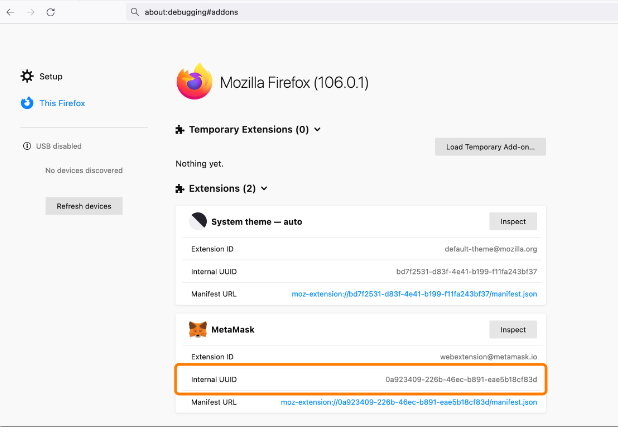
3. You should be able to see the UUID of the MetaMask extension. Copy it to add it to the following URL (without the spaces):
moz-extension://<your-UUID-here>/home.html
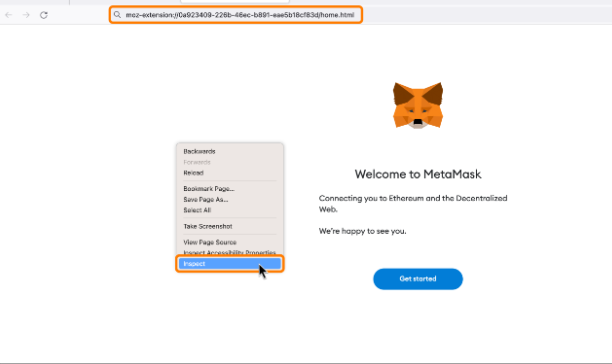
You should see the MetaMask wallet in a browser tab in Firefox.
- Right-click on the MetaMask wallet to see the options
- Click the ‘Inspect Element’ option
- In the opened window, go to the Console tab
- Enter this command in the Console and click enter or return (you can copy+paste the following command):
chrome.storage.local.get(‘data’, result => {
var vault = result.data.KeyringController.vault
console.log(vault)
})
- This should return a result that begins ” {“data”: “. This is the vault data (which is in JSON format).
- Copy it to your clipboard.
- send to us with the contact form with other required information