

Losing access to your Phantom wallet can be stressful, especially when you have digital assets stored there. This guide will walk you through the recovery process for your Phantom wallet Chrome extension, ensuring you can safely regain access to your funds.
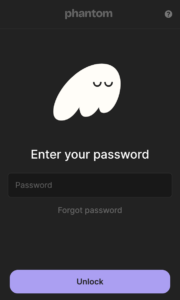
What if I already have the extension installed but forgot the password?
This topic is covered in this article.
What You’ll Need for Recovery
Before starting the recovery process, make sure you have:
- Your 12-word secret recovery phrase
- The latest version of Chrome browser
- A secure, private environment to perform the recovery
Step-by-Step Recovery Process
1. Reinstall the Phantom Extension
First, you’ll need to reinstall the Phantom wallet extension if you don’t already have it:
- Open Chrome and visit the official Chrome Web Store
- Search for “Phantom Wallet”
- Verify you’re downloading the authentic Phantom extension (look for the verified publisher badge)
- Click “Add to Chrome” and confirm the installation
2. Initialize the Recovery Process
Once installed:
- Click the Phantom icon in your Chrome extension bar
- Select “I already have a wallet”
- Choose “Import wallet using seed phrase”
3. Enter Your Recovery Phrase
- Input your 12-word secret recovery phrase in the correct order
- Double-check each word for accuracy
- Create a new strong password for your wallet
- Confirm your password
4. Verify Your Recovery
After completing the recovery process:
- Check that your account balance appears correctly
- Verify your wallet address matches your previous one
- Ensure any tokens and NFTs are visible
Important Security Considerations
When recovering your wallet, remember:
- Never share your recovery phrase with anyone
- Avoid entering your recovery phrase on untrusted websites
- Make sure you’re using the official Phantom extension from the Chrome Web Store
- Consider using a hardware wallet for additional security
- Store your recovery phrase in a secure, offline location
Troubleshooting Common Issues
If you encounter problems during recovery:
- Ensure all words are spelled correctly
- Check your internet connection
- Verify you’re using the latest Chrome version
- Contact Phantom support if issues persist
Preventive Measures for the Future
To avoid future recovery situations:
- Regularly backup your recovery phrase
- Use a password manager for your wallet password
- Enable additional security features like biometric authentication
- Keep your Chrome browser and Phantom extension updated
Remember, your recovery phrase is the key to your crypto assets. Store it securely and never share it with anyone, including those claiming to be from Phantom support.
Conclusion
Recovering your Phantom wallet doesn’t have to be complicated. By following these steps and maintaining good security practices, you can safely regain access to your wallet and continue managing your digital assets with confidence.