

Desktop WALLET ONLY no mobile WALLET SUPPORT!
What do you will need to do?
1. Find your wallet directory and files
2. Remind everything you know about the password
3. Contact with us for the next steps
If you have forgotten the password to your Atomic Desktop wallet and lost your seed phrase but the wallet is still installed on your computer… yest your funds may be recoverable. All you need is to locate the files and gather as much information about the password and contact us.
Where to find directories for Phantom desktop wallet recovery process?
Windows
C:\Users[Your Username]\AppData\Roaming\atomicmacOS
/Users/[Your Username]/Library/Application Support/atomicLinux: Ubuntu
/home/[Your Username]/.config/atomicAll the files fro atomic directories may help in the recovery process. Contact us to find out more.
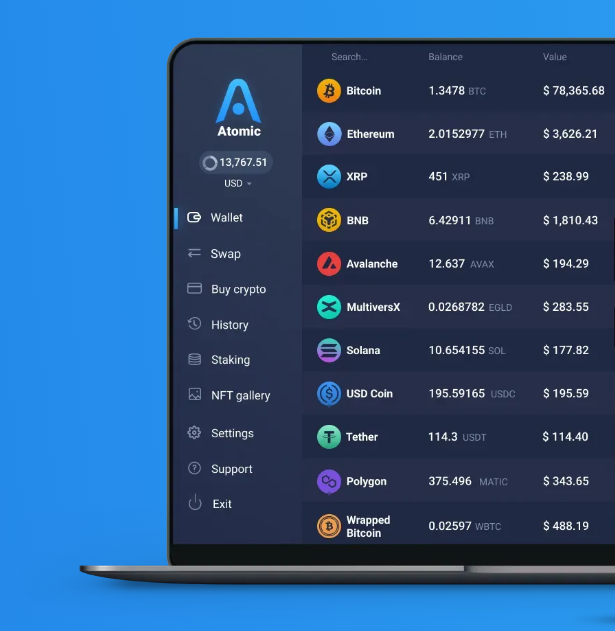
In the ever-evolving world of cryptocurrencies, finding a reliable and user-friendly wallet is crucial. Enter the Atomic Desktop wallet – a powerful solution for managing your digital assets. This comprehensive guide will explore the features, benefits, and reasons why Atomic Desktop wallet stands out in the crowded cryptocurrency landscape.
What is Atomic Desktop Wallet?
Atomic Desktop wallet is a multi-currency, non-custodial cryptocurrency wallet that supports over 300 coins and tokens. Developed by Atomic Wallet Company, it offers a secure and intuitive platform for storing, managing, and exchanging various cryptocurrencies.
Key Features of Atomic Desktop Wallet
1. Multi-Currency Support
- Store and manage over 300 cryptocurrencies
- Support for popular coins like Bitcoin, Ethereum, and Litecoin
- Compatibility with a wide range of tokens
2. Built-in Exchange
- Swap cryptocurrencies directly within the wallet
- Competitive rates and fast transactions
- No need for external exchanges
3. Staking Capabilities
- Earn passive income by staking supported cryptocurrencies
- User-friendly staking process
- Regular rewards distribution
4. Advanced Security
- Client-side encryption ensures private keys never leave your device
- Support for hardware wallet integration
- Two-factor authentication (2FA) for added security
5. User-Friendly Interface
- Intuitive design suitable for beginners and experienced users
- Real-time portfolio tracking
- Easy-to-use backup and restore features
Why Choose Atomic Desktop Wallet?
- Security: With client-side encryption and non-custodial storage, your funds remain under your control.
- Convenience: Manage multiple cryptocurrencies from a single interface.
- Flexibility: Built-in exchange and staking features offer versatility.
- Regular Updates: The development team consistently improves the wallet’s features and security.
- Cross-Platform Compatibility: Available for Windows, macOS, and Linux.
Getting Started with Atomic Desktop Wallet
- Visit the official Atomic Wallet website
- Download the desktop version for your operating system
- Install the application
- Create a new wallet or restore an existing one
- Secure your wallet with a strong password and backup phrase
Conclusion
Atomic Desktop wallet offers a robust solution for cryptocurrency enthusiasts seeking a secure, feature-rich, and user-friendly platform. With its wide range of supported currencies, built-in exchange, and staking capabilities, it’s an excellent choice for both newcomers and experienced users in the crypto space.
Start your journey with Atomic Desktop wallet today and experience the convenience of managing your digital assets in one secure location.
Remember: Always practice safe crypto habits, keep your private keys secure, and never share your backup phrase with anyone.